Tuesday, 27 March 2012

The fprintf Function in C & C++


You can open a text or binary file with fopen and close it with fclose. (See here.) The fprintf function allows you to “print” data to a text file. It is similar to the printf function except the output goes to a file instead of the standard output.

A note on text files versus binary files. If you open a text file with an editor program, chances are you can read and make some sense of what’s there. Not so with a binary file. The binary file is raw data in the way variables stored in memory are raw data—binary data. But text files store binary data as well, but along the way, it’s converted to a human readable form using an ASCII table or Unicode character set. So while you may write “Hello World” to a text file and see it as such, it is being converted to some binary code.

Back to the fprintf function. The same code explains it.

Test Code.

I tested the functions in Visual C++ 2010 as an console application.

// The standard library includes the system function.
#include <cstdlib>

// C++ standard I/O library.
#include <cstdio>

int main()
{
     // Header.
     printf("\"Print\" Data To A Text File\n\n");

     // Pointer to the file.
     FILE* pFileHandle;

     // Puts the file in the project path.
     char Filename[] = "MyFile.txt";

     // Version 1.
     // w attribute for writing to the file.
     // If the file does not exist, it is created.
     // Any existing file content is overwritten.
     printf("File attribute: w - (over) write\n");
     pFileHandle = fopen(Filename, "w");

     // Write data to file.
     fprintf(pFileHandle , "\"Print\" Data To A Text File\n\n");
     fprintf(pFileHandle , "Writing some data to a text file.\n");
     fprintf(pFileHandle , "Any existing data in the file is lost.\n");

     // Close the file.
     int iReturn = 0;
     iReturn = fclose(pFileHandle);

     // Version 2.
     // a attribute for appending to the file.
     // If the file does not exist, it is created.
     // Any existing file content remains.
     printf("File attribute: a - appending\n");
     pFileHandle = fopen(Filename, "a");
     // Write data to file.
     fprintf(pFileHandle , "With appending mode, text is added to the file.\n");

     // Close the file.
     iReturn = fclose(pFileHandle);

     // Version 3.
     // What happens when you try to write data to a file opened for reading.
     printf("File attribute: r - reading\n");
     pFileHandle = fopen(Filename, "r");
     // Write data to file.
     fprintf(pFileHandle , "With reading mode, text isn't added to the file.\n");
     // There is no run-time error or compile error.

     // Close the file.
     iReturn = fclose(pFileHandle);

     // Keep console window open.
     system("pause");

     // Return some value.
     return 0;
} // end main


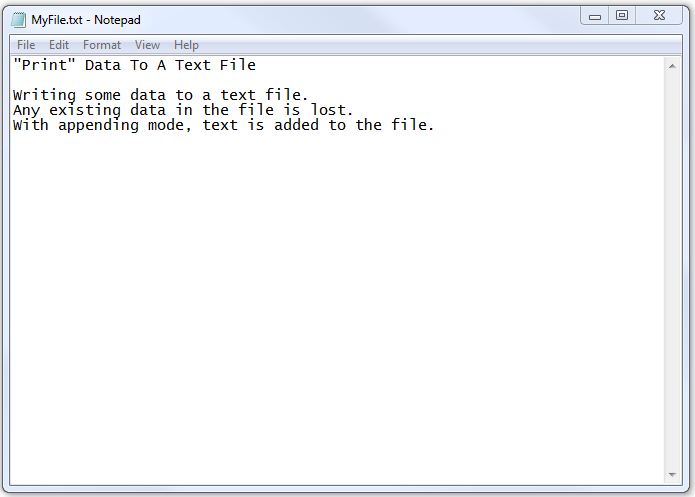
Text File.


Monday, 26 March 2012

A Common Error In C & C++


In C and C++ there’s a difference between the = assignment operator and the == logical equality operator. In many other languages, the equal sign is used in both situations; therefore, it’s easy to use = when you want to use ==.

You compiler won’t tap you on the shoulder to tell you made a mistake. It will happily chug along. There is no syntax error. The problem happens when you run the program. Besides, assigning the value to the variable, I tested some code to see what would happen.

Take this scenario.

     int a = 0;
     if (a = 1){…

First the program will assign 1 to a then it will evaluate the expression a as being non-zero (i.e., not false) and execute any code for the true condition.

This code

     if (a = 0){…

assigns zero to a and results in a false condition.

Similar events happen with the do and while loops.

How about a for loop like this?

     for (i = 0; a = i; ++i) {…

Since a equals i equals 0, it’s false and the for loop doesn’t execute any code under its control.

On the other hand, this code,

     for (i = 1; a = i; ++i) {…

creates an infinite loop. Be ready to hit break.

It’s the easiest mistake to make in C and C++ especially if you’re working with other languages at the same time.

Sunday, 25 March 2012

Modulus With Negative Numbers in C & C++


What it is correct answer when calculating the modulus of two numbers when one of the numbers is negative? When it comes to computers, the answer is: it depends.

The starting point is basic division of integers. Take a dividend, a, and divide it by the divisor, b, to get some result that is a quotient, q, and a remainder, r, if any. The modulus of a and b is the remainder, r. This division theorem works for all numbers that are integers, provided b is not zero.

 
If the a and b have the same sign (both positive or both negative), the quotient is positive. If their signs are opposite (one negative, one positive), the quotient is negative. What about the modulus? It’s easy to think the same process applies, but does it? No.

To calculate r, use the division equation for known values of a, b and q.

The following code in Visual C++ 2010 shows the four different possibilities pos+/neg- values for a and b.

 // Header.
printf("Modulus With Negative Numbers\n\n");
printf("a x b = q + r OR b x q + r = a\n\n");

int a = 7;
int b = 2;
printf("a = %d, b = %d \n", a, b);
printf("q: %d / %d = %d \n", a, b, a / b);
printf("r: %d mod %d = %d \n", a, b, a % b);
// 2 x 3 + 1 = 7
printf("%d x %d + %d = %d \n\n", b, a / b, a % b, a);

a = -7;
b = 2;
printf("a = %d, b = %d \n", a, b);
printf("q: %d / %d = %d \n", a, b, a / b);
printf("r: %d mod %d = %d \n", a, b, a % b);
// 2 x -3 - 1 = -7
printf("%d x %d + %d = %d \n\n", b, a / b, a % b, a);

a = 7;
b = -2;
printf("a = %d, b = %d \n", a, b);
printf("q: %d / %d = %d \n", a, b, a / b);
printf("r: %d mod %d = %d \n", a, b, a % b);
// -2 x -3 + 1 = 7
printf("%d x %d + %d = %d \n\n", b, a / b, a % b, a);

a = -7;
b = -2;
printf("a = %d, b = %d \n", a, b);
printf("q: %d / %d = %d \n", a, b, a / b);
printf("r: %d mod %d = %d \n", a, b, a % b);
// -2 x 3 - 1 = -7
printf("%d x %d + %d = %d \n\n", b, a / b, a % b, a);

Output.


You will get the same results in Visual Basic.

When it comes to using the modulus operator, test it with a range of expected parameters to make sure it gives the result you expect and want. Not all versions of C or C++ or other languages behave the same. If all else fails, create your own modulus function to work the way you want.

Saturday, 24 March 2012

The fopen and fclose Functions in C & C++


The cstdio library provides two functions for opening and closing a text file: fopen, fclose. Both functions use a FILE type pointer variable. The FILE type is defined in the library.

The fopen function requires a filename and a tag to specify the mode of access (read, write, append etc.) It returns a handle for accessing the file. The fclose function closes the file associated with the handle.

The first step is to create a pointer of the FILE type.

FILE * pFileHandle;

You open a text file for reading with this code:

pFileHandle = fopen("Filename", "r");

If the file does not exist, the functions returns NULL, otherwise it holds a handle for the opened file.

The file mode, “w” opens a file for writing. If the file does not exist, it is created. If the file exists, any existing data is overwritten.

pFileHandle = fopen("Filename", "w");

Finally, you can use the “a’ tag to append to a file. If the file does not exist, it is created. If the file exists, data is added to the end of the file.

pFileHandle = fopen("Filename", "a");

While it’s possible to close a file this way,

fclose(pFileHandle);

You should confirm the close function worked by analyzing the return value such as:

int iReturn = 0;
iReturn = fclose(pFileHandle);

If the return value is EOF, there was an error closing the file, otherwise the file was closed.

 
Test Code.

I tested the functions in Visual C++ 2010 as an console application.

// The standard library includes the system function.
#include <cstdlib>

// C++ standard I/O library.
#include <cstdio>

// C++ math library.
#include <cmath>

int main()
{
     // Header.
     printf("File Open, File Close.\n");
     printf("For text files.\n\n");

     // Pointer to the file.
     FILE* pFileHandle;

     // Puts the file in the project path.
     char Filename[] = "MyFile.txt";

     // Version 1.
     // r attribute for reading the file.
     // Fails to open if the file does not exist.
     printf("File attribute: r\n");
     pFileHandle = fopen(Filename, "r");
     if (pFileHandle != NULL)
           printf("File exists.\n");
     else
           printf("File doesn't exist.\n");
     printf("File Handle: %X \n\n", pFileHandle);

     // Version 2.
     // w attribute for writing to the file.
     // If the file does not exist, it is created.
     // Any existing file content is overwritten.
     printf("File attribute: w\n");
     pFileHandle = fopen(Filename, "w");
     if (pFileHandle != NULL)
           printf("File exists.\n");
     else
          printf("File doesn't exist.\n");
     printf("File Handle: %X \n\n", pFileHandle);

     // Version 3.
     // a attribute for appending to the file.
     // If the file does not exist, it is created.
     // Any existing file content remains.
     printf("File attribute: a\n");
     pFileHandle = fopen(Filename, "a");
     if (pFileHandle != NULL)
           printf("File exists.\n");
     else
           printf("File doesn't exist.\n");
     printf("File Handle: %X \n\n", pFileHandle);

     // Close the file.
     int iReturn = 0;
     iReturn = fclose(pFileHandle);
     // iReturn = 0 or false, means success closing the file.
     // iReturn = EOF means an error.
     if (iReturn == EOF)
           printf("Error closing the file.\n");
     else
           printf("File closed.\n");
     printf("File Handle: %X \n\n", pFileHandle);

     // Return some value.
     return 0;
} // end main


Output.

Friday, 23 March 2012

Using XOR To Encrypt Message


The XOR logic operator provides a convenient way to encrypt a message. By encrypt I refer to the technique where a letter of a readable message is substituted with another letter to make the encrypted message unreadable. At least at first glance.

The basic algorithm to encrypt a message is

message letter XOR key letter = encrypted letter

and to decrypt it’s:

encrypted letter XOR key letter = message letter.

Using the XOR operator with the same key results in symmetry for encrypting and decrypting. To understand that, take a closer look at what happens at the bit level.

I want to encrypt the letter A with the key letter of K.

A is 0x41 or 0100 0001 and K is 0x4B or 0100 1011.

A    0100 0001
K    0100 1011

XOR  0000 1010

So my encrypted letter is 0x0A.  Given that value and my key of K, I can run the same process to get the message back.

Ct   0000 1010
K    0100 1011

XOR  0100 0001

Why does it work? Look at the four possibilities:

A xor  K  = Ct xor K  = A
1      1    0      1    1
1      0    1      0    1
0      1    1      1    0
0      0    0      0    0

For each of the four possibilities, using XOR with the same key value brings you back to the original message.

Here is some sample code in C/C++.

// The standard library includes the system function.
#include <cstdlib>

int main()
{
     printf("Encrypt Message Using XOR\n\n");
     char msg = 'A';
     char key = 'K';
     char crypto;

     // Encipher.
     crypto = msg ^ key;
     printf("XOR of msg (%X) and key (%X) results in %X.\n\n", msg, key, crypto);

     // Decipher.
     msg = crypto ^ key;
     printf("XOR of crypto (%X) and key (%X) results in %X.\n\n", crypto, key, msg);
    

     // Keep console window open.
     system("pause");

     // Return some value.
     return 0;
} // end main

Output.


Mouse Over To Activate A Window in Windows 7

For a while now I’ve been using a computer with Windows 7 and there was one behaviour that was driving me nuts. If I opened up a window that didn’t fill the screen, say using Notepad to view a text file, within seconds, the window would disappear. The window below it would now come to the front. To avoid this problem, I had to quickly move the mouse over the new window before it would disappear and more times than not, it would disappear.

I never had this problem with other versions of Windows. There had to be some setting to change the behaviour. You’d think it had something to do with the appearance settings, but no. It’s in the mouse settings.

From the Control Panel, click on “Ease of Access.”


Then click on “Change how your mouse works.”


You can toggle “Activate a window by hovering over it with the mouse.” When it’s enabled, mousing over a window will bring it to the front.  When it’s off, mousing away from your current window won’t cause it to lose focus. That’s how I want it and problem solved.


Saturday, 17 March 2012

Using Logarithms


I was watching a documentary on the history of modern computers and came across a few interesting items. I say modern computers because prior to the 1940s, a computer was a person, not a thing. He, primarily, was a person who computed numbers hours after hour. It wasn’t necessarily accounting figures, but anything, like artillery tables, navigational guides, or census statistics. Lots and lots of numbers. Numbers computed without aid of any mechanical devices.

If they wanted to add up a series of numbers, they had to add them up. If they wanted to multiply two numbers, they would consult tables to find the natural logarithmic of the numbers, add those numbers then find that sum in another table to give you the multiplied value. Every step of the process was an opportunity to create an error including the values in the tables. These books of tables were after all created by humans and contained errors. Imagine trying to copy out a telephone book by hand and not make a mistake.

Sometime in the 19th century Charles Babbage had the idea of creating a machine to eliminate the human error these computers created. It’s suggested his initial concept was the start of computers we know today. Perhaps. One of his difficulties was his choice to use the decimal numbering system instead of binary. Perhaps it wasn’t a choice, just standard operating procedure. Not thinking outside the box. If he had worked on a binary system, he may have built the prototype he had in mind.

And those tables? Here is an example. Say I want to know what 3.3 times 4.4 is because those are the dimensions of some object. I could do the multiplication by hand, double check my figures and report the result. What if I had to do that fifty times in a day? Or more? Look for a faster approach.

The natural logarithm of 3.3 is 1.19392247 and for 4.4, it’s 1.48160454. These log numbers come from a table. As with most people, I can add those numbers together faster than I can multiply them. The result is 2.67552701. Now I find what e to that number is and I come up with 14.52 which is 3.3 times 4.4.

So,

e(ln A + ln B) = A x B

The same works for division.

e(ln A - ln B) = A / B

I haven’t figured out how slide rulers work. No need, just curious.

The tanh Function in C & C++


More functions from the  <math.h> or <cmath> header files. Today it’s about the tanh function.

The tanh function returns the hyperbolic tangent for any real number and is defined as shown below.


From C11 standard.


The newest standard includes the atanh function, but it is not implemented in Visual C++ 2010; however, you can use the log function to determine the arc hyperbolic tangent.


Test Code.

I tested the functions in Visual C++ 2010 as an console application.

// The standard library includes the system function.
#include <cstdlib>

// C++ standard I/O library.
#include <cstdio>

// C++ math library.
#include <cmath>

int main()
{
     // Header.
     printf("The tanh Function in C & C++\n\n");
     printf("Given x, any real number, the function returns y \n");
     printf("equal to the hyperbolic tangent of x.\n\n");

     // Counter for loop.
     int i;
     // Argument.
     double x;
     // Result.
     double y, y2;

     printf("    x   =>  tanh(x) = (exp(2*x) - 1.0) / (exp(2*x) + 1.0) \n\n");
     for (i = -5; i <= 5; ++i)
    {
           x = i * 1.0;              
           y = tanh(x);
           y2 = (exp(2*x) - 1.0) / (exp(2*x) + 1.0);
           printf ("%6.1f  => %8.4f = %8.4f\n", x, y, y2);
     }
     // Keep console window open.
     system("pause");

     // Return some value.
     return 0;
} // end main


Output.


Friday, 16 March 2012

The cosh Function in C & C++


More functions from the  <math.h> or <cmath> header files. Today it’s about the cosh function.

The cosh function returns the hyperbolic cosine for any real number and is defined as shown below.


From C11 standard.


The newest standard includes the acosh function, but it is not implemented in Visual C++ 2010; however, you can use the log function to determine the arc hyperbolic cosine.


 Test Code.

I tested the functions in Visual C++ 2010 as an console application.

// The standard library includes the system function.
#include <cstdlib>

// C++ standard I/O library.
#include <cstdio>

// C++ math library.
#include <cmath>

int main()
{
     // Header.
     printf("The cosh Function in C & C++\n\n");
     printf("Given x, any real number, the function returns y \n");
     printf("equal to the hyperbolic cosine of x.\n\n");

     // Counter for loop.
     int i;
     // Argument.
     double x;
     // Result.
     double y, y2;

     printf("    x   =>  cosh(x) =  0.5 * (exp(x) + 1.0/exp(x)) \n\n");
     for (i = -5; i <= 5; ++i)
     {
           x = i * 1.0;              
           y = cosh(x);
           y2 = 0.5 * (exp(x) + 1.0/exp(x));
           printf ("%6.1f  => %8.4f = %8.4f\n", x, y, y2);
     }
     // Keep console window open.
     system("pause");

     // Return some value.
     return 0;
} // end main
 

Output.


Tuesday, 13 March 2012

The sinh Function in C & C++


More functions from the  <math.h> or <cmath> header files. Today it’s about the sinh function.

The sinh function returns the hyperbolic sine for any real number and is defined as shown below.


From C11 standard.


The newest standard includes the asinh function, but it is not implemented in Visual C++ 2010; however, you can use the log function to determine the arc hyperbolic sine.


Test Code.

I tested the functions in Visual C++ 2010 as an console application.

// The standard library includes the system function.
#include <cstdlib>

// C++ standard I/O library.
#include <cstdio>

// C++ math library.
#include <cmath>

int main()
{
     // Header.
     printf("The sinh Function in C & C++\n\n");
     printf("Given x, any real number, the function returns y \n");
     printf("equal to the hyperbolic sine of x.\n\n");

     // Counter for loop.
     int i;
     // Argument.
     double x;
     // Result.
     double y, y2;

     printf("    x   =>  sinh(x) =  0.5 * (exp(x) - 1.0/exp(x)) \n\n");
     for (i = -5; i <= 5; ++i)
     {
           x = i * 1.0;              
           y = sinh(x);
           y2 = 0.5 * (exp(x) - 1.0/exp(x));
           printf ("%6.1f  => %8.4f = %8.4f\n", x, y, y2);
     }
     // Keep console window open.
     system("pause");

     // Return some value.
     return 0;
} // end main

Output.